Relations (Many-To-Many) Editable
General
The relations editable provides many to many relation to other Pimcore elements (document, asset, object).
Configuration
| Name | Type | Description |
|---|---|---|
width | integer | Width for the widget in pixels (optional) |
height | integer | Height for the widget in pixels (optional) |
title | string | Title for the input-widget |
uploadPath | string | Target path for (inline) uploaded assets |
disableInlineUpload | boolean | Disable the inline upload for assets. If set to true, the inline upload functionality will be disabled. |
types | array | Allowed types (document, asset, object), if empty all types are allowed |
subtypes | array | Allowed subtypes grouped by type (folder, page, snippet, image, video, object, ...), if empty all subtypes are allowed (see example below) |
classes | array | Allowed object class names, if empty all classes are allowed |
class | string | A CSS class that is added to the surrounding container of this element in editmode |
reload | boolean | true triggers page reload on each change |
Methods
| Name | Return | Description |
|---|---|---|
getElements() | array | Array of the assigned elements |
current() | int | Get the current index while looping |
isEmpty() | boolean | Whether the editable is empty or not |
Example
Basic Usage
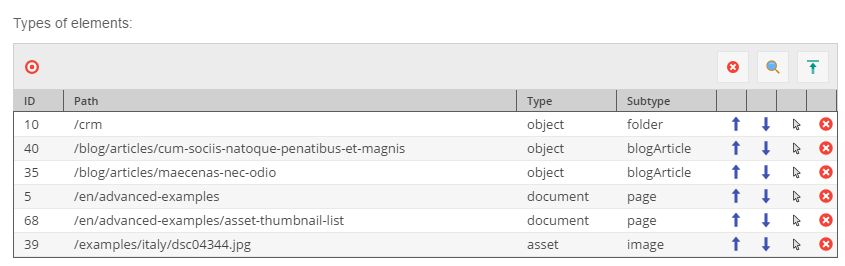
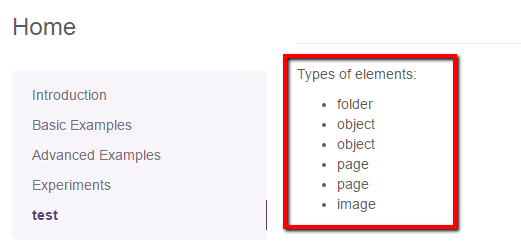
The code below is responsible for showing a list of elements types related to the relations editable.
<p>{{ "Types of elements" | trans }}:</p>
{% if editmode %}
    {{ pimcore_relations("objectPaths") }}
{% else %}
<ul>
    {% for element in pimcore_relations("objectPaths") %}
        <li>{{ element.getType() }}</li>
    {% endfor %}
</ul>
{% endif %}
Picture below, presents the editmode preview:

The frontend part looks like that:

To better understand what exactly is the $element variable, have a look at the output below:
array(6) {
  [0] => string(27) "Pimcore\Model\DataObject\Folder"
  [1] => string(32) "Pimcore\Model\DataObject\BlogArticle"
  [2] => string(32) "Pimcore\Model\DataObject\BlogArticle"
  [3] => string(27) "Pimcore\Model\Document\Page"
  [4] => string(27) "Pimcore\Model\Document\Page"
  [5] => string(25) "Pimcore\Model\Asset\Image"
}
Example with allowed types and subtypes
Similar to the single relation editable, this editable also could specify allowed types, subtypes and classes.
For example:
{{ pimcore_relations("objectPaths", {
    "types": ["asset","object"],
    "subtypes": {
        "asset": ["video","image"],
        "object": ["object"]
    },
    "classes": ["person"]
}) }}
Now, a user is not able to add other elements than specified in the types configuration part.