Block Editable
General
The block element is an iterating component which is really powerful. Basically a block is only a loop, but you can use other editables within this loop, so it's possible to repeat a set of editables to create structured content (eg. a link list, or a image gallery). The items in the loop as well as their order can be defined by the editor with the block controls provided in the editmode.
Configuration
| Name | Type | Description |
|---|---|---|
limit | integer | Max. amount of iterations. |
reload | bool | Reload editmode on add, move or remove (default=false) |
default | integer | If block is empty, this specifies the iterations at startup. |
manual | bool | Forces the manual mode, which enables a complete custom HTML implementation for blocks, for example using <table> elements |
class | string | A CSS class that is added to the surrounding container of this element in editmode |
Methods
| Name | Return | Description |
|---|---|---|
isEmpty() | bool | Whether the editable is empty or not. |
getCount() | int | Get the total amount of iterations. |
getCurrent() | int | Get the current index while looping. |
getElements() | array | Return a array for every loop to access the defined children. |
The Block Controls
| Control | Operation |
|---|---|
 | Add a new block at the current position. |
 | Remove the current block. |
 | Move Block up and down. |
Basic Usage
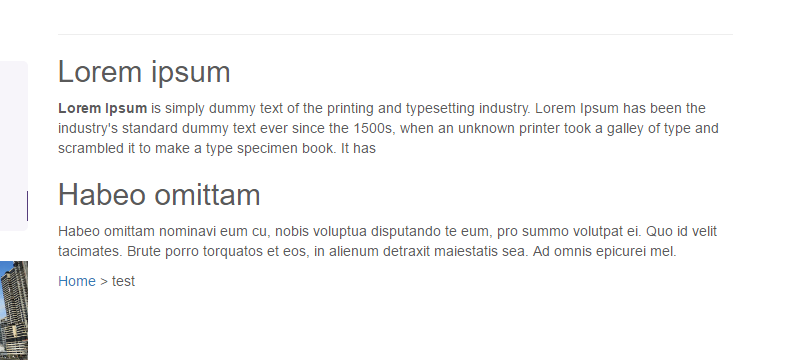
{% for i in pimcore_block('contentblock').iterator %}
    <h2>{{ pimcore_input('subline') }}</h2>
    {{ pimcore_wysiwyg('content') }}
{% endfor %}
The result in editmode should looks like to following:

And in the frontend of the application:

Advanced Usage
Example for getCurrent()
{% set myBlock = pimcore_block('contentblock', {'reload': true}) %}
{% for i in myBlock.iterator %}
    {% if myBlock.current > 0 %}
        Insert this line only after the first iteration<br />
        <br />
    {% endif %}
    <h2>{{ pimcore_input('subline') }}</h2>
{% endfor %}
IMPORTANT If you want to change content structure dynamically for each index in editmode, then it is required to use
reload=trueconfig.
Using Manual Mode
The manual mode offers you the possibility to deal with block the way you like, this is for example useful with tables:
{% set block = pimcore_block('gridblock', {'manual' : true, 'limit' : 6}).start() %}
<table>
    <tr>
        {% for b in block.iterator %}
            {% do block.blockConstruct() %}
              <td customAttribute="{{ pimcore_input("myInput").getData() }}">
                    {% do block.blockStart() %}
                        <div style="width:200px; height:200px;border:1px solid black;">
                            {{ pimcore_input("myInput") }}
                        </div>
                    {% do block.blockEnd() %}
                </td>
            {% do block.blockDestruct() %}
        {% endfor %}
    </tr>
</table>
{% do block.end() %}
Using Manual Mode with custom button position
If you want to wrap buttons in a div or change the Position.
{% set block = pimcore_block("gridblock", {"manual": true}).start() %}
<table>
    <tr>
        {% for b in block.iterator %}
            {% do block.blockConstruct() %}
                <td customAttribute="{{ pimcore_input("myInput").data }}">
                    {% do block.blockStart(false) %}
                        <div style="background-color: #fc0; margin-bottom: 10px; padding: 5px; border: 1px solid black;">
                            {% do block.blockControls() %}
                        </div>
                        <div style="width:200px; height:200px;border:1px solid black;">
                            {{ pimcore_input("myInput") }}
                        </div>
                    {% do block.blockEnd() %}
                </td>
            {% do block.blockDestruct() %}
        {% endfor %}
    </tr>
</table>
{% do block.end() %}
Using Manual Mode with additional css class for element in editmode
{% set block = pimcore_block("gridblock", {"manual": true}).start() %}
<div>
    {% for b in block.iterator %}
        {% do block.blockConstruct() %}
            {% do block.blockStart(true, false, 'my-additional-class') %}
                Add additional class 'my-addional-class' to editmode-div
            {% do block.blockEnd() %}
        {% do block.blockDestruct() %}
    {% endfor %}
</div>
{% do block.end() %}
Accessing Data Within a Block Element
Bricks and structure refer to the CMS demo (content/default template).
{# load document #}
{% set document = pimcore_document_by_path('/en/More-Stuff/Developers-Corner/Galleries') %}

{# get the first picture from the first "gallery-carousel" brick #}
{% set image = document.getEditable('content').getElement('gallery-single-images')[5].getBlock('gallery').getElements()[0].getImage('image') %}

{{ dump(document.getEditable('content').getElement('gallery-single-images')) }}
{{ dump(image.getSrc()) }}